sudo vi /usr/share/tomcat6/bin/catalina.sh |
At the beginning of the file, after initial comment block add:
# setting JAVA_OPTS to perform JAVA_OPTS="-Xms512m -Xmx1024m -XX:MaxPermSize=384m -Xss128k" |
Restart tomcat:
sudo service tomcat6 restart |
sudo vi /usr/share/tomcat6/bin/catalina.sh |
At the beginning of the file, after initial comment block add:
# setting JAVA_OPTS to perform JAVA_OPTS="-Xms512m -Xmx1024m -XX:MaxPermSize=384m -Xss128k" |
Restart tomcat:
sudo service tomcat6 restart |
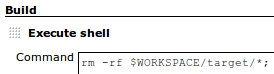
In order to clean/delete the workspace before the build, “Add Build Step”, select “Execute Shell”, and use Hudson $WORKSPACE variable to delete the target directory:
rm -rf $WORKSPACE/target/* |
Here is what it will look like:
built-in support is on the way: HUDSON-3966
Have a user, whose public key was successfully added under “gitolite-admin/keydir” and whose rights were successfully configured under “gitolite-admin/conf/gitolite.conf”.
When this very user is cloning an existing, correctly configured repository, his/her identity ( public key ) is not being passed correclty => hence notice a password prompt:
$ git clone git@yourgitserver.com:your-project Cloning into your-project... git@yourgitserver.com's password: fatal: 'your=project' does not appear to be a git repository fatal: The remote end hung up unexpectedly |
Here is the way to help out git / gitolite to understand which identity ( key ) to use:
$ vi ~/.ssh/config |
host gitolite
     user git
     hostname yourgitserver.com
identityfile ~/.ssh/mypubkey |
Now changing “git@yourgitserver.com” to “gitolite” does the trick:
$ git clone gitolite:your-project Cloning into your-project... remote: Counting objects: 83, done. remote: Compressing objects: 100% (77/77), done. remote: Total 83 (delta 3), reused 0 (delta 0) Receiving objects: 100% (83/83), 156.45 KiB | 49 KiB/s, done. Resolving deltas: 100% (3/3), done. |
Notice, public key was successfully accepted => hence there was no password prompt, and the clone was successful.
Since git is a “content” based SCM, and empty directories by git are not considered to be content [ which is arguable ], the only way to add them is to add “.gitignore” to every empty directory.
That may sound like a weird task after each time you create a Grails / Rails / Spring Roo / … project, since there are going to be many empty directories right from start.
To ease the pain, here is an alias you can add to your “.bashrc” to use before “git add .”:
# add '.gitignore' to all the empty dirs alias ged='for i in $(find . -type d -regex ``./[^.].*'' -empty); do touch $i"/.gitignore"; done;' |
one liner author: justinfrench.com
Assuming WPA/WPA2 security is used, first thing to do is to get a hash/hex of the password. Below “myssid” is the wireless network’s SSID, and “mypassword” is the password for this network.
Step 1 Generate a WPA password hash to be used later when setting up network interfaces:
$ wpa_passphrase myssid # reading passphrase from stdin mypassword network={ ssid="myssid" #psk="mypassword" psk=2f0568b3492812bd56b946dbaf3fd7dd669b9a4602a09aa6462ff057949b025c } |
Step 2 Configure a wireless network interface using the password hash from Step 1:
$ vi /etc/network/interfaces |
auto wlan0 # configuring a static IP iface wlan0 inet static address 192.168.0.34 gateway 192.168.0.1 network 192.168.0.0 broadcast 192.168.0.255 netmask 255.255.255.0 # OR if static IP is not needed ignore above 6 lines and uncomment the one below # iface wlan0 inet dhcp # configure WPA/WPA2 security wpa-ssid myssid wpa-psk 2f0568b3492812bd56b946dbaf3fd7dd669b9a4602a09aa6462ff057949b025c |