
"; */ ?>


16
Jun 10

IntelliJ IDEA Ubuntu Launcher

IntelliJ IDEA Ubuntu Launcher

IntelliJ IDEA is very easy to install: download and unzip, can’t be simpler.

However creating a launcher for it is not that straightforward, whether it is a Gnome / KDE keyboard shortcut, desktop launcher, docking launcher ( e.g. avant window navigator ) or a simple “Alt+F1” menu item.

But it is Ubuntu after all: the virtual land of unlimited possibilities.

Here is a simple launcher script that will do the trick:

#!/bin/bash
 
export JAVA_HOME=/usr/lib/jvm/java-6-sun
export JDK_HOME=/usr/lib/jvm/java-6-sun
 
export IDEA_HOME=/opt/idea-IU-95.66
 
export IDEA_VM_OPTIONS="$IDEA_HOME/bin/idea.vmoptions"
export IDEA_PROPERTIES="$IDEA_HOME/bin/idea.properties"
 
cd "$IDEA_HOME/bin"
export LIBXCB_ALLOW_SLOPPY_LOCK=1
 
./idea.sh

A couple of things to note:

1. Point JAVA_HOME and JAVA_JDK to the place where you have JDK installed
2. Point IDEA_HOME where you have IntelliJ IDEA installed
3. Make this script executable e.g. chmod +x idea-launcher.sh [ given that you name it “idea-launcher.sh”, of course ]

Now you are free to create any kind of launcher that suites your needs pointing it to this script.


06
Apr 10

Spring Batch: Quick Start

Spring Source Logo

You heard about Spring Batch, but have this “uneasy” feeling about where/how/what you should start with? A year ago it was truly difficult for a non geek developer (most of the developers) to start with projects like Spring Batch, Spring Integration, Spring Webflow, Spring MVC, etc.. But now..

Now, you have no excuse: it is extremely simple to build a sample Spring project, of pretty much any “flavour”, that comes pre-built with unit and integration tests, that you can run right after those 12 seconds that you spent downloading the project, and resolving dependencies.

Does it sound helpful? Well, not really, since I just said what will happen, and how easy it is to make it happen, but there was no how part… I hate when people do that :)

So without further ado, here comes the “how” part:

Step 1. DON’T PANIC :)

After successful completion of Step 1, it is time for…

Step 2. Download Spring Tool Suite

As I already mentioned in “Spring Insight in Action – 5 Minutes From Scratch“, I like to think about Spring Tool Suite as Eclipse on Spring rocks (Spring IDE, Spring Interactive Tutorials, Exception Resolution, Grails support, Spring Insight, Spring tc Server, Spring Template Projects, and much more): http://www.springsource.com/products/springsource-tool-suite-download

Step 3. Create New Spring Template Project

After Spring Tool Suite is started (remember, it is just a Spring version of Eclipse, so it should look very familiar), press Ctrl+n to create “something” new, and start typing “spring temp…”:
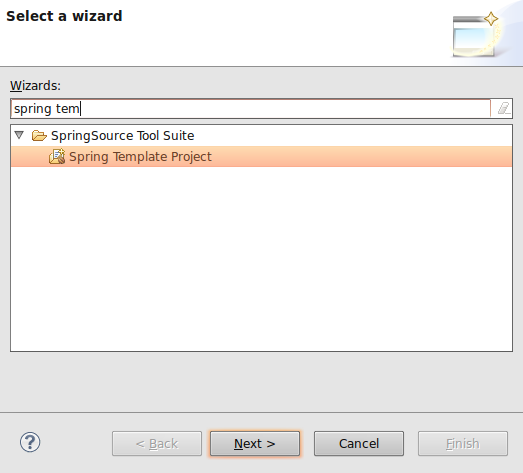
Spring Tool Suite: New Spring Template Project

As you type, Eclipse will narrow down selection to “Spring Template Project”. Select it, and click Next:
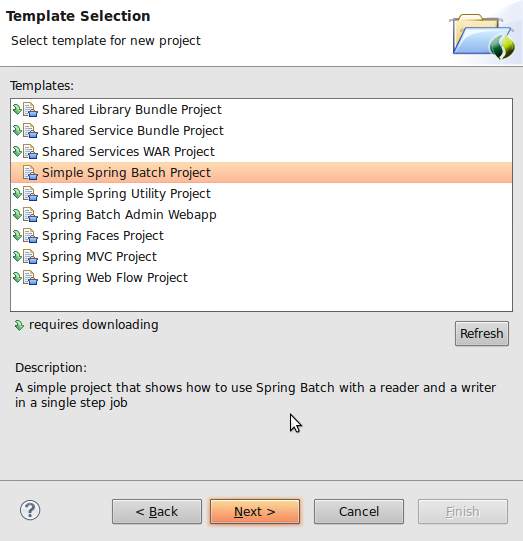
Spring Tool Suite: New Spring Batch Template Project

Here you can see many hot and ready to go Spring template projects that you can explore. The purpose of this article is to show how easy it is to start with Spring Batch, but for the most part, you can follow these steps to create all of the projects from the list above. (as an extra credit, try to create a Spring Integration Template project, once we done here).

Select “Simple Spring Batch Project”, and click Next:
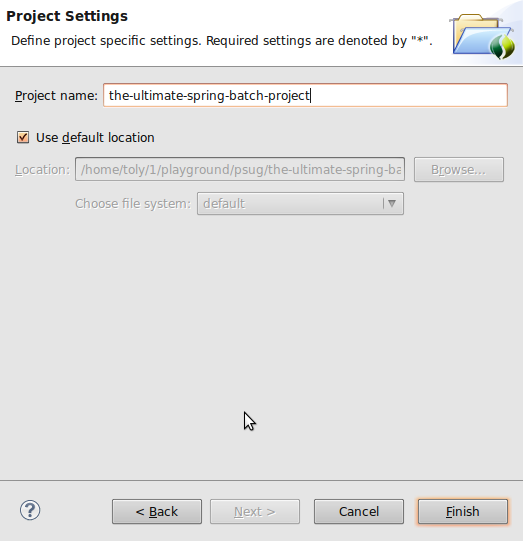
new spring batch template project name

Name your fresh and ready to go Spring Batch project, and click Finish, here is what your own Spring Batch project will look like:
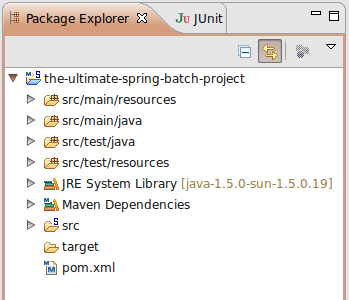
spring batch template project live

You are actually done right here, but, since curiosity is what makes us humans, let’s take a look at what’s inside:
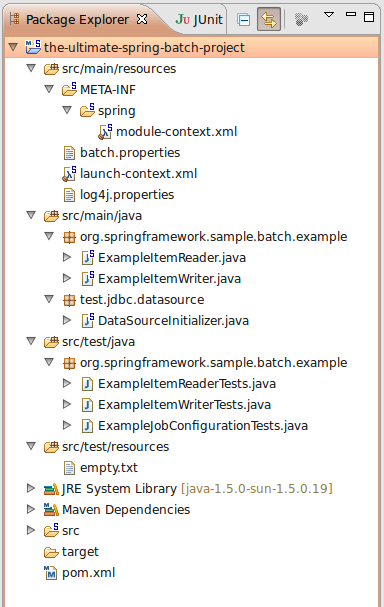
spring batch template project structure

As you can see, it is a Maven structured project with all the goodies: source, tests, pom, configs, etc..

Let’s look at your first real Batch Job. Double click on “module-context.xml”:
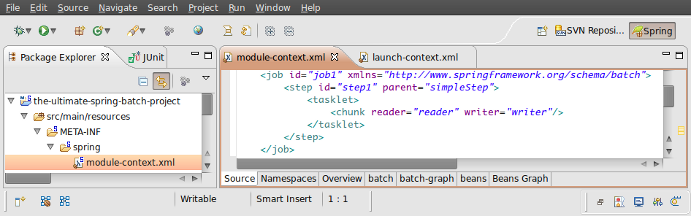
spring batch template project job config

In order to make sense of what you are looking at, you can refer to a very good and extensive Spring Batch documentation: http://static.springsource.org/spring-batch/reference/html/index.html

Step 4. Make Sure It Works

But hey, don’t just believe me that it works => make sure it does! And how would you do that? Well, again, simple: just run a test:
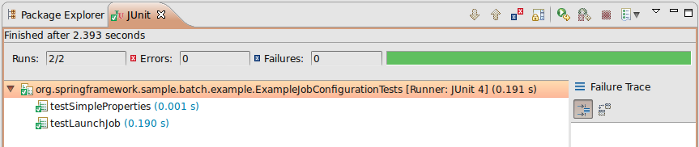
spring batch template project run test

Now you should see some green, which actually tells you: “it works indeed”.

Now you see, that starting to work on any major Spring Project is only a couple of mouse clicks away. You can really feel how close and accessible all that knowledge is. So be brave and take it all!

Good Luck!


07
Mar 10

Think About Code Quality

code-qualityRecently one of my friends from work asked me to help him improve the process around code quality and developer productivity. So I compiled my thoughts and e-mailed to him, but then I realized that it may be very helpful for others who are involved in software industry. Are you? Then keep reading.. :)

Although tools and frameworks listed here are JVM-based language focused, the approach can be definitely reused with any other environment / language / technology. So without further ado, here it goes:

The center of the code quality monitoring can be either Continuous Integration ( e.g. Cruise Control: http://cruisecontrol.sourceforge.net/ ) or Sonar ( http://sonar.codehaus.org/ ). Sometimes both.

Continuous Integration should be setup to “Intergarte Continuously” :) which means every time something is checked in, force a build. That is the whole purpose of “Continuous Integration”, and that is why I am really against the way Cruise Control is used on some client sites [builds on demand by pressing a build button.. grrr, back to 1990-ties].

So given that “Continuous Integration” is not misused, it will be plugged in with PMD ( http://pmd.sourceforge.net/ ) / Findbugs ( http://findbugs.sourceforge.net/ ), Checkstyle ( http://checkstyle.sourceforge.net/ ) and Test Coverage ( e.g. Cobertura: http://cobertura.sourceforge.net/ ) tools that will generate reports, and reflect the only true state of the code that is checked into the repository.

Now, as to a developer corner..

RAD is nothing more than just an Eclipse with lots of bloated (mostly unused IBM plugins). But being Eclipse it is very pluginable by nature. This means that PMD / Checkstyle / Cobertura reports can be available to developers prior checking in the code. PMD / Checkstyle at compile time, Cobertura at (test) run time. If possible, try to use something like Spring Tool Suite: http://www.springsource.com/products/sts, which is also an Eclipse, but much lighter (compare to RAD), faster and smarter “pluged-in”.

As far as testing. JUnit (http://www.junit.org/) should be aimed to cover two different separate layers of testing: Component/Unit Testing and Integration Testing. Component tests should be aimed to test exclusively content of the component with all of its dependencies mocked out ( http://mockito.org/ ). Where as Integration tests should test how well components integrate together, with all the test data staged ( in case DB is used: http://www.dbunit.org/ )

As for the test coverage, 85% to 90% is a good goal to aim for. Do not sign off, until this level of coverage is reached no matter how close your dead lines are, since if you do, that will increase amount of defects ten fold, that is just a law :)

If developers work on code that is / can be deployed to an Application Server, such as Tomcat, JBoss, Geronimo ( if you’re unlucky, Websphere :) ), consider getting JRebel ( http://www.zeroturnaround.com/jrebel/ ), it’ll boost developers productivity by.. let’s just say “a lot” :)

This is how I see it, and this really works for me, and projects around me.


10
Feb 10

Multiple Around Advices Applied to the Same Join Point

Spring and AspectJ

So, what do you think will happen if you apply two around advices to the same join point? They both call “proceedingJoinPoint.proceed()” which calls their target object.

But then if the target object is the same, then it is going to be called twice.. Hmm.. not something you would want to happen especially if that target object is a service that withdraws money from your bank account..

According to the Spring documentation, you may specify the order in which these advices are applied, using Ordered interface, so in case the target object (that service that withdraws money from your account) is called twice, you have an opportunity to specify the order of who calls it first:)

To free the minds of many from unnecessary worries, I’ll show you what really happens when two around advices are applied to the same join point.

Here is this target object (transfer money service):

public class WireTransferMoneyService implements TransferMoneyService {
 
	public void transferMoney( Money money, 
			         Account sourceAccount,
			         Account targetAccount) {
 
		// Start the "Wire Transfer" manager
		// ...
 
		System.err.println( this.getClass().getSimpleName() + " is called" );
 
		sourceAccount.withdraw( money );
		targetAccount.deposit( money );	
	}
}

And here are the two around advices that are applied to this transfer service:

@Around("com.xmen.iii.aspect.SystemArchitecture.businessService()")
public Object doSomethingOnTransfer(ProceedingJoinPoint pjp) throws Throwable {
 
	System.err.println( Thread.currentThread().getStackTrace()[1].getMethodName() +
			" \t\twas called before " + pjp.getTarget().getClass().getSimpleName() );
 
	Object retVal = pjp.proceed();
 
	System.err.println( Thread.currentThread().getStackTrace()[1].getMethodName() +
			" \t\twas called after " + pjp.getTarget().getClass().getSimpleName());
 
	return retVal;
}
 
@Around("com.xmen.iii.aspect.SystemArchitecture.businessService()")
public Object doSomethingElseOnTransfer(ProceedingJoinPoint pjp) throws Throwable {
 
	System.err.println( Thread.currentThread().getStackTrace()[1].getMethodName() +
			" \twas called before " + pjp.getTarget().getClass().getSimpleName() );
 
	Object retVal = pjp.proceed();
 
	System.err.println( Thread.currentThread().getStackTrace()[1].getMethodName() +
			" \twas called after " + pjp.getTarget().getClass().getSimpleName() );
 
	return retVal;
}

Now it’s simple: let’s run it and see what happens… And that is what happens:

2010-02-10 19:52:47,542 INFO [org.springframework.test.context.TestContextManager] - <@TestExecutionListeners is not present for class [class com.xmen.iii.integration.TransferLoggingAspectTest]: using defaults.>
2010-02-10 19:52:47,667 INFO [org.springframework.beans.factory.xml.XmlBeanDefinitionReader] - <Loading XML bean definitions from class path resource [com/xmen/iii/integration/TransferLoggingAspectTest-context.xml]>
2010-02-10 19:52:47,808 INFO [org.springframework.beans.factory.xml.XmlBeanDefinitionReader] - <Loading XML bean definitions from class path resource [META-INF/spring/aspect-context.xml]>
2010-02-10 19:52:47,839 INFO [org.springframework.beans.factory.xml.XmlBeanDefinitionReader] - <Loading XML bean definitions from class path resource [META-INF/spring/app-context.xml]>
2010-02-10 19:52:47,917 INFO [org.springframework.context.support.GenericApplicationContext] - <Refreshing org.springframework.context.support.GenericApplicationContext@1820dda: display name [org.springframework.context.support.GenericApplicationContext@1820dda]; startup date [Wed Feb 10 19:52:47 EST 2010]; root of context hierarchy>
2010-02-10 19:52:47,917 INFO [org.springframework.context.support.GenericApplicationContext] - <Bean factory for application context [org.springframework.context.support.GenericApplicationContext@1820dda]: org.springframework.beans.factory.support.DefaultListableBeanFactory@1126b07>
2010-02-10 19:52:48,355 INFO [org.springframework.beans.factory.support.DefaultListableBeanFactory] - <Pre-instantiating singletons in org.springframework.beans.factory.support.DefaultListableBeanFactory@1126b07: defining beans [transferMoneyService,messageSource,org.springframework.aop.config.internalAutoProxyCreator,com.xmen.iii.aspect.logging.ServiceLoggingAspect#0,org.springframework.context.annotation.internalCommonAnnotationProcessor,org.springframework.context.annotation.internalAutowiredAnnotationProcessor,org.springframework.context.annotation.internalRequiredAnnotationProcessor]; root of factory hierarchy>
"
doSomethingOnTransfer                   was called before WireTransferMoneyService
doSomethingElseOnTransfer               was called before WireTransferMoneyService
WireTransferMoneyService is called
doSomethingElseOnTransfer               was called after WireTransferMoneyService
doSomethingOnTransfer                   was called after WireTransferMoneyService
"
2010-02-10 19:52:48,433 INFO [org.springframework.context.support.GenericApplicationContext] - <Closing org.springframework.context.support.GenericApplicationContext@1820dda: display name [org.springframework.context.support.GenericApplicationContext@1820dda]; startup date [Wed Feb 10 19:52:47 EST 2010]; root of context hierarchy>
2010-02-10 19:52:48,433 INFO [org.springframework.beans.factory.support.DefaultListableBeanFactory] - <Destroying singletons in org.springframework.beans.factory.support.DefaultListableBeanFactory@1126b07: defining beans [transferMoneyService,messageSource,org.springframework.aop.config.internalAutoProxyCreator,com.xmen.iii.aspect.logging.ServiceLoggingAspect#0,org.springframework.context.annotation.internalCommonAnnotationProcessor,org.springframework.context.annotation.internalAutowiredAnnotationProcessor,org.springframework.context.annotation.internalRequiredAnnotationProcessor]; root of factory hierarchy>

So, as you can see, AspectJ and Spring are modest but smart, they chain those around advices for you, which is of course niice.

Happy Advising!


10
Feb 10

Sharing My Stargate Address

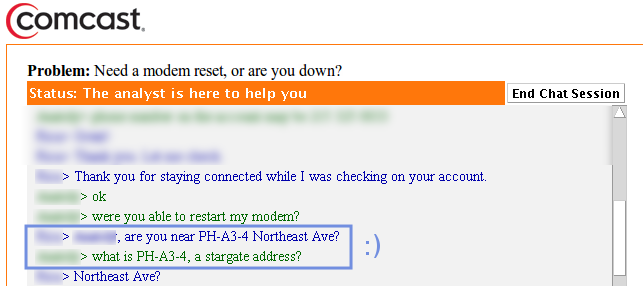
I guess you have it as well, if you use Comcast as your Internet Service Provider. Apparently they have these little Stargates that allow us to travel to different.. well not planets yet ( we, as a young human race, are starting slow ), but zip codes for starters. Inter-continent near real time travel is also available. But, of course, Earth would be our scope for now. Hopefully all the wormholes are blacklisted, and every traveler is equiped with a reliable iris.

It all started as a hunch, but then was officially confirmed by the Comcast’s Freudian slip:
My Stargate Address